TechMesto
  • Guides
    • Windows
    • Android
  • News
  • Mobiles
    • Nokia
    • OnePlus
    • Samsung
    • Xiaomi
  • Social Networks
TechMesto
  • Guides
    • Windows
    • Android
  • News
  • Mobiles
    • Nokia
    • OnePlus
    • Samsung
    • Xiaomi
  • Social Networks
TechMesto
  • Guides
    • Windows
    • Android
  • News
  • Mobiles
    • Nokia
    • OnePlus
    • Samsung
    • Xiaomi
  • Social Networks
Microsoft

Login to Microsoft Account Using Phone Number as Username

Last updated on August 2, 2020
1 Comment
Narender Singh
1 Comment
2 Min Read
    Share This!
    FacebookXPinterestWhatsApp

Unlike Google where you can simply log in using your Gmail username (for Gmail users), Microsoft requires you to enter the full email address to login. This is necessary since Microsoft offers emails under multiple domains and hence the usernames would overlap.  An easier alternative to typing a long email address is to use the phone number to log in. But for that to work, you need to manually enter the phone number in your account as an alias, aside from possibly having it as an account recovery option.

Add Mobile Number as Microsoft Account Alias

Adding the mobile phone number as an alias would allow you to log in by entering the phone number in place of the email address. However, do note that a phone number can be used as an alias in only one Microsoft account. If you add the same phone number to another account, it will automatically be removed from the first. Here’s how you can add the phone number as an account alias.

  1. Login to your Microsoft account at account.live.com.
  2. Click on the Your info option from the horizontal menu bar.
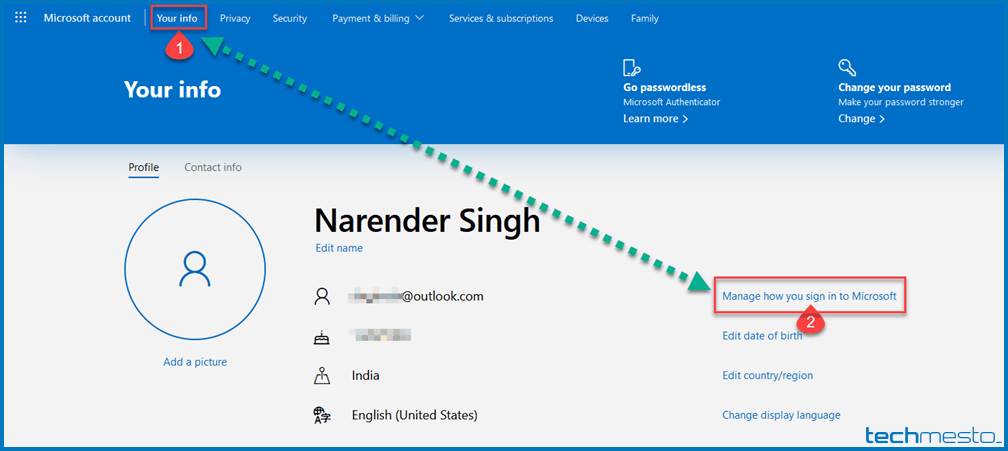
    Edit Microsoft account info
  3. Click on ‘Manage how you sign in to Microsoft’. You can also click here to reach the page directly. You might be asked to enter your password again.
  4. Select ‘Add phone number’ under Account aliases.
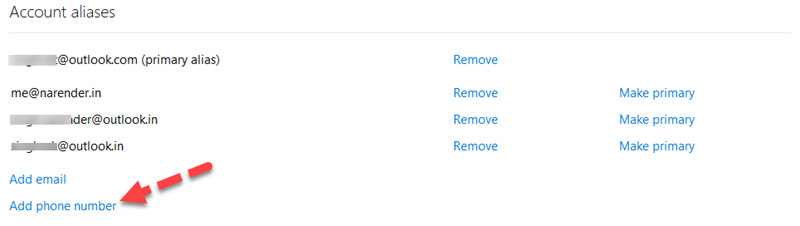
    Account Aliases Microsoft Account
  5. Choose your country code and then enter your mobile number. Click Next.
  6. Enter the 4-digit code sent via SMS to your phone number. Click Next.
  7. It’s done. Your phone number instantly gets listed under your aliases. Now you can make use of the phone number as your username and existing password to login to your Microsoft account.

You can also use other email addresses as Alias to your Microsoft account. Then you can also make use of those email addresses to log in to the same Microsoft account.
Share this post:

  • Click to share on Facebook (Opens in new window) Facebook
  • Click to share on X (Opens in new window) X
  • Click to share on WhatsApp (Opens in new window) WhatsApp
  • Click to share on Telegram (Opens in new window) Telegram
  • Click to share on Reddit (Opens in new window) Reddit
TagsGmail Microsoft Account Outlook.com

You may also like

Redeem Microsoft Rewards points as Amazon Pay Gift Card in India
Microsoft • Search Engines

Amazon Pay Gift Cards are back on Bing Rewards (India)

Last updated on February 1, 2026
Outlook.com logo on a blue background
Microsoft

Make Outlook.com return to email list after deleting an email

Published on March 3, 2025
OneDrive shared folders turning into Web Links
Microsoft

OneDrive shared folders are turning into web links & cannot sync with Windows Explorer

Published on March 3, 2025

Follow us

  • facebook
  • twitter
  • youtube
  • rss

Latest Posts

Redeem Microsoft Rewards points as Amazon Pay Gift Card in India
Microsoft • Search Engines

Amazon Pay Gift Cards are back on Bing Rewards (India)

February 1, 2026
Airtel Xstream router in bridge mode
Computing

How to Enable Bridge Mode on Airtel Xstream fiber broadband?

December 11, 2025
PS plus black friday promotion
Sony

Why you don’t see black friday discount on PS Plus membership?

November 26, 2025
Remove Google search bar on home screen of HMD and Nokia smartphones
HMD • Nokia

Remove Google search bar from homescreen of HMD smartphones

October 7, 2025
Move Google Chrome's address bar to the bottom
Android • Web Browsers

How to Move Google Chrome’s address bar to the bottom (Android)

August 22, 2025

Recent Comments

  • หวยเกาหลี on Warranty Details of YU – Customer Support & Service Locations
  • Skrota bil Göteborg on Warranty Details of YU – Customer Support & Service Locations
  • ขายฝาก on Warranty Details of YU – Customer Support & Service Locations
  • ซื้อหวยลาว on Warranty Details of YU – Customer Support & Service Locations
  • ชุดเครื่องเสียง on Warranty Details of YU – Customer Support & Service Locations

Subscribe for email updates!

Enter your email address to subscribe to this blog and receive notifications of new posts by email.

Join 4,115 other subscribers

Important Links

  • Home
  • About Us
  • Privacy & Cookie Policy
  • Contact Us

Search this website

Disclosures

  • This site uses cookies to improve your experience. If you do not wish to use cookies on this site, you can disable cookies in your web browser.
  • Some of the links on this site are affiliate links.
DMCA.com Protection Status
Copyright © 2021. TechMesto